
Apps

Canva app by Storyship

Revoice

Revoice helps Canva creators upload an existing voice or video clip, review the script, edit replacement narration, and generate a polished voiceover that can be added back to Canva.
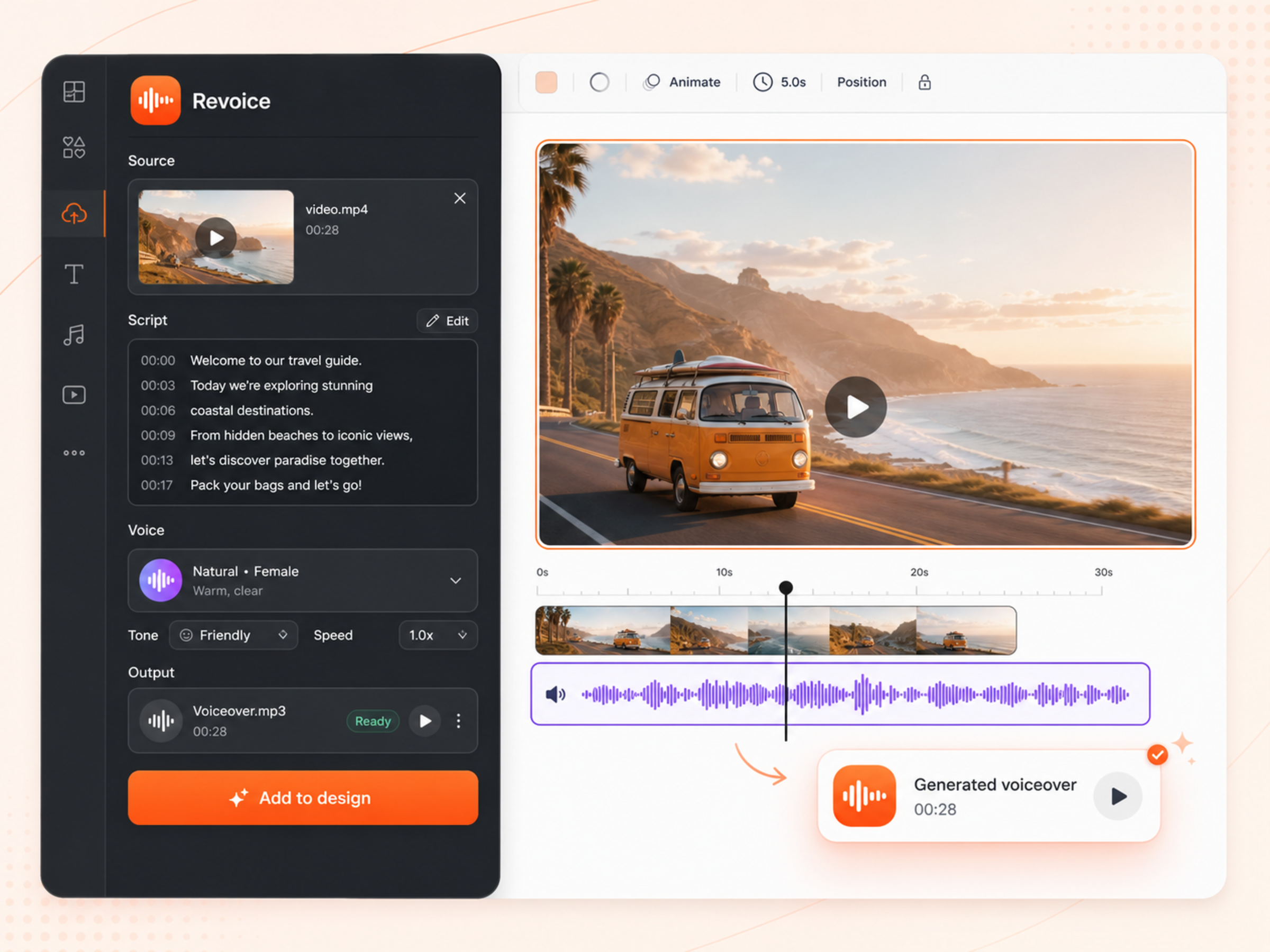

Upload audio or video clips from your Canva workflowReview and edit transcript segments before generationGenerate replacement narration with voice and style controls
Canva
Revoice Canva app preview

From recorded clip to polished narration

See credit packs
01

Upload a clip

Start from an audio or video file with narration that needs a cleaner replacement take.

02

Edit the script

Review the detected script, adjust wording, and choose the voice settings before generation.

03

Add the polished take

Generate replacement narration, preview it, then add the finished audio back into Canva.

What it does

  • Upload audio or video clips from your Canva workflow
  • Review and edit transcript segments before generation
  • Generate replacement narration with voice and style controls
  • Preview the polished take before adding it to Canva
  • Storyship-managed Canva credits, checkout, and failed-job refunds

Best for

Video narration updatesLocalization draftsProduct demo refreshesCourse content editsSocial video variants

Ready to supercharge your creativity?

Explore Storyship apps for Canva and Figma.